


Draft Punk - Fantasy Football
4.61.46K Reviews
App Specs
- Version
- 26.0.0
- Updated On
- License
- Free
- Downloads
- 100,000+
- Developer
- Josh Clemm
- Categories
- Sports
- Platform
- Android
Screenshots
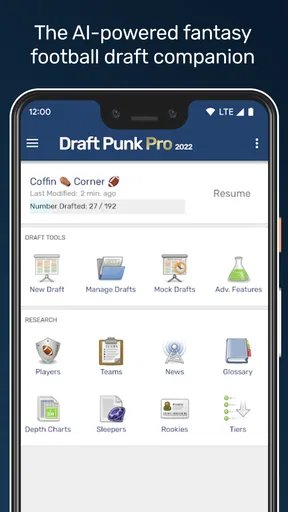

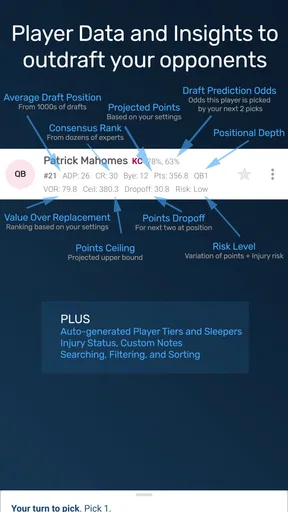
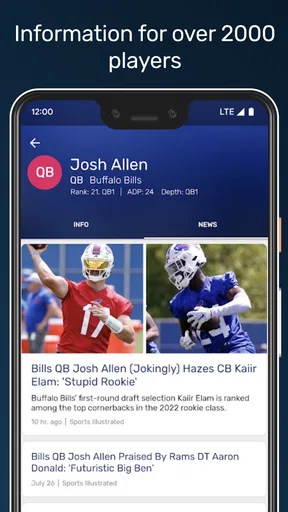
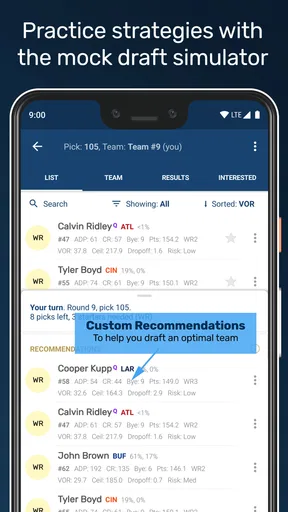
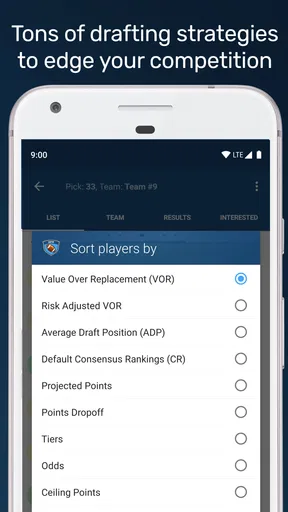
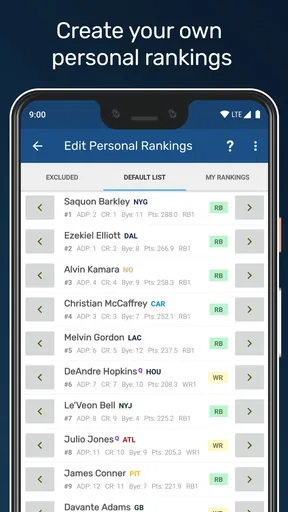
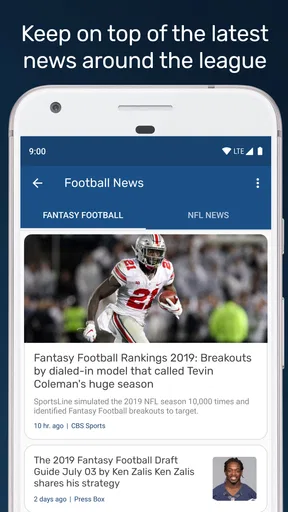
 Analysis by AppCompare
I approached Draft Punk - Fantasy Football as the kind of tool I would open before a league draft, not as a replacement for the draft room itself. Its purpose is focused: it helps me prepare for fantasy football selections with AI-assisted advice, so I can arrive with a plan instead of making every decision from memory or panic. That narrow role is also its biggest strength. I do not need to learn a full fantasy platform just to get value from it.
Developed by Josh Clemm, this free sports app is aimed at fantasy football players who want extra guidance while building a draft strategy. It has an average rating of 4.6 from around 3.7 thousand ratings, with more than 100 thousand installs, which suggests that it has found a practical audience among players who prefer a dedicated draft companion. The app is rated for Everyone, and the current version is 26.0.0, with Android support starting at version 5.0.
My overall impression is that it works best as a second set of eyes. I would not hand over every decision to an AI recommendation, especially in a league with unusual scoring or rules. But when I am comparing several players, trying to avoid a weak early pick, or looking for a way to organize my thinking, the app can make the process feel less scattered. Its real value is not replacing fantasy knowledge; it is reducing decision fatigue when the clock is running.
How the app feels to read and navigate
I find that the app’s focused purpose makes it easier to approach than a broad fantasy-sports platform, but I still treat its advice as something to evaluate rather than follow automatically. In this section, I look at how a reader can keep recommendations manageable and prepare a shortlist before draft pressure sets in. That preparation leads naturally to a closer look at how different people and settings can shape the experience.
A focused interface is easier to approach
The most helpful accessibility quality here is the app’s narrow purpose. A fantasy football draft companion has a clearer job than a large sports platform packed with news, scores, league chats, advertisements, and account sections. When I open a tool like this, I already know why I am there: I want help making draft choices. That focus can benefit people who find crowded interfaces tiring or who need to limit the amount of information competing for attention.
The short name, “Draft Punk,” is memorable, while the longer description, “Fantasy Football,” makes the use case clearer for someone browsing an app catalog. I would still recommend spending a little time with it before draft day. Any advice tool becomes harder to use when a person is learning the controls, interpreting unfamiliar recommendations, and making a time-sensitive selection at the same moment.
For me, the best workflow is preparation first and live use second. Before the draft, I would open the app in a quiet setting, look through the available guidance, and decide what information I actually want to follow. During the draft, I would keep the app as a reference rather than repeatedly exploring every screen. This reduces the amount of navigation required when attention is already divided between the app, the league room, and the players being selected.
Worth Reading Before You Choose

Flipboard Shows What News Apps Must Do Beyond the Feed

Switching to Android Auto Means Rethinking Your Driving Routine

Google Calendar Makes a Crowded Week Easier to Manage

Ludo King Makes the Most of the Minutes Between Plans

Baby Panda World Brings Quick Play to Modern Phones, but Its Game Library Feels Busy

ESPN’s Live Game View Makes Following Close Games Easier
Readable advice matters more than a busy dashboard
AI-generated guidance is only useful when I can quickly understand what it is suggesting and why. A recommendation that presents too many competing options can be difficult for anyone, particularly users who process written information more slowly or who become overwhelmed by dense sports terminology. I found it more useful to treat each suggestion as a prompt for a decision, not as a command that must be followed immediately.
One practical tip is to create a personal shortlist before draft night. I can use the app to shape that shortlist, then rely on it as a compact reference instead of reading every available detail in real time. This is a small change, but it improves readability because I am comparing a few prepared choices rather than trying to absorb an entire player pool while the draft moves forward.
The app is also more approachable for a casual fantasy player than a large statistical site can be. Someone who understands the basics of fantasy football but does not enjoy building spreadsheets may prefer a direct recommendation tool. On the other hand, experienced players who need deep filters, custom projections, or detailed historical breakdowns may find a focused companion too limited compared with a specialist website or a spreadsheet they control themselves.
Where navigation can still demand concentration
The AI angle creates an important trade-off. Guidance may feel simpler than manually comparing every player, but it can also make the reasoning less transparent than a table full of visible statistics. If I cannot quickly tell which assumptions shaped a recommendation, I have to slow down and judge whether it fits my league. That extra interpretation is manageable in preparation, but less comfortable when a pick is urgent.
I would therefore avoid using the app as my only source of draft information. A person who needs very explicit explanations, large amounts of supporting context, or a highly customizable research view may be better served by a conventional fantasy analysis site. Draft Punk is most comfortable for users who want a nudge toward a decision and are willing to apply their own judgment afterward.
Using it across different abilities and situations
I think the most useful way to judge a draft companion is to consider the person using it, the device setup, and the pace of the league—not just the advice itself. Here I consider practical adjustments for reading, handling, and attention, while keeping the app’s role as a support tool in view. Those considerations also help clarify who is likely to benefit most from using it.
Motor considerations during a live draft
Fantasy drafts can create a difficult physical context. I may be holding another device, switching between a league platform and the companion, or trying to make a selection before time runs out. For someone with limited dexterity, tremors, reduced reach, or difficulty with fast repeated taps, that environment can turn a helpful tool into another source of pressure.
My recommendation is to prepare the app before the draft begins. Open the relevant material, keep the device in a stable position, and avoid depending on rapid navigation between several screens. If possible, use a larger display or place the phone where it can be viewed without being held continuously. These are ordinary setup choices, but they can make the difference between consulting advice calmly and abandoning it because the physical workflow is too demanding.
The app is not the right choice for someone who needs a completely hands-free draft process. I would not assume that AI guidance removes the need for manual interaction, and I would not build a league strategy around controls that have not been tested personally. A user who relies on switch access, voice control, or specialized input should try the exact draft workflow well before the league meeting rather than discovering a barrier during a timed pick.
Visual and sensory comfort
Sports information can become visually intense very quickly. Player names, recommendations, rankings, and draft updates all compete for attention, while a live league may add chat messages and notifications. I found that the app is easiest to use when I decide in advance what I am looking for. Instead of treating every item as equally important, I can use the companion to answer a specific question, such as whether a player fits my current roster plan.
That selective approach may help people who are sensitive to visual clutter or who have difficulty filtering rapidly changing information. It also helps users with limited attention in noisy settings. I would still test the display in the lighting where the draft will happen, because glare, small text, and screen brightness can affect comfort even when an app’s content is otherwise straightforward.
For users with reading difficulties, the practical advantage is the ability to prepare a short set of decisions rather than repeatedly scan a long list. I would write down a few plain-language rules for myself, such as when to prioritize a position or when to pause and reassess. The app can support that preparation, but it does not replace a personal system that makes recommendations easier to interpret under pressure.
Situational access outside the draft room
The app makes the most sense when I have enough time to think. On a commute, in a noisy room, or while managing family responsibilities, I may not be able to give an AI recommendation the attention it deserves. In those moments, the best use is light preparation: reviewing a strategy, checking a shortlist, or identifying questions to revisit later. I would avoid making important selections while distracted simply because the app is available on my phone.
A realistic example is a weekday evening before a league draft. I might have only a short break, so I open the companion, review the players I am considering, and note where its advice agrees or disagrees with my own plan. Later, when the draft starts, I already know which disagreements require attention. That is more accessible than trying to conduct a complete analysis while talking with league members and watching the clock.
The free price also lowers the barrier to trying it. There are in-app purchases ranging from $2.99 to $6.99 per item, so I would check what is included before treating any optional purchase as necessary. A person on a strict budget can begin without paying, then decide whether an extra item genuinely improves their workflow. I would not recommend buying anything simply to compensate for uncertainty about how the core experience fits a particular league.
The Everyone content rating makes the app suitable for a broad age range, but age suitability is not the same as universal usability. A younger player may still need help understanding fantasy scoring, while an older player may prefer larger text, slower preparation, or a more conventional statistics layout. The app’s usefulness depends less on age than on comfort with fantasy football decisions and AI-supported advice.
Remaining barriers for league-specific play
The biggest barrier is not necessarily the interface; it is the gap between general advice and the exact rules of a league. Fantasy football formats can differ in roster construction, scoring, draft order, and personal preferences. If the app’s recommendation does not reflect those details in the way I expect, I have to adjust it mentally. That is manageable for an experienced player, but it can be confusing for someone who assumes that an AI suggestion is automatically tailored to every league.
This is where I think a traditional spreadsheet or a detailed fantasy website may be better. Those alternatives can take more effort, but they make the user responsible for clearly entering assumptions and seeing the underlying comparisons. Draft Punk is more convenient when I want a quick companion; a spreadsheet is more transparent when I need complete control.
Another barrier is confidence. Some users may follow a recommendation because it sounds authoritative, even when their league rewards a different strategy. My rule is simple: if the advice conflicts with a known league rule or a clear roster need, I investigate before acting. The app should support a decision, not overrule information I already know to be relevant.
There is also a social consideration. A live draft may involve several people sharing a room or a video call, and using a second screen can split attention. I would tell league members that I am consulting a draft tool, then use it discreetly and briefly. If the social part of the draft is more important than optimization, a paper shortlist may actually be the more accessible option because it keeps me engaged with the group.
Who will benefit most from it
I see the strongest fit in three kinds of players. The first is a beginner who understands the basic idea of fantasy football but does not know how to turn that understanding into a draft plan. The second is a casual manager who wants help without spending hours building a custom ranking system. The third is an experienced player who already has opinions but wants a quick outside check before committing to a pick.
It can also help people who struggle with decision overload. When every available player seems plausible, an external recommendation can create a starting point. The important nuance is that the app works best when I use that starting point to ask better questions. I might notice that I am ignoring roster balance, reaching too early for a position, or reacting to a familiar name instead of following a plan.
I would skip it if I want a complete league-management platform, extensive research tools, or a fully transparent statistical model. It is also not my first recommendation for someone who dislikes AI-assisted suggestions on principle. In that case, a manually maintained ranking sheet or a conventional analysis resource will feel more honest and controllable.
My inclusive verdict after using the companion
Draft Punk - Fantasy Football is a useful, low-cost way to make draft preparation less intimidating, especially for players who want focused guidance rather than a large sports dashboard. Its accessibility strengths come from its specific purpose, its suitability for advance preparation, and the way it can reduce the number of decisions I need to hold in my head at once.
Its limitations are just as important. I still need to verify that the advice fits my league, prepare for the physical demands of a live draft, and decide whether the presentation works for my vision, reading style, and attention needs. The app should not be treated as a hands-free solution, a guaranteed answer, or a substitute for understanding scoring rules.
For me, the fairest recommendation is to install it before draft day and test a complete personal workflow: review the guidance, create a shortlist, compare suggestions with league rules, and practice switching back to the actual draft platform. If that process feels clear and comfortable, the companion can be a genuinely helpful support. If I need deep customization, extensive explanations, or specialized input methods, another fantasy football resource will probably serve me better.
As a free sports app from Josh Clemm, with optional in-app purchases and a long-running presence since its release on August 13, 2010, it occupies a sensible middle ground between doing everything manually and relying on a full professional analysis setup. I would recommend it to a friend who wants practical draft assistance and is comfortable keeping final control of every pick. That balance—AI for direction, personal judgment for the decision—is where it feels most inclusive and most useful.
Pros
- Quickly create and manage fantasy football drafts with an intuitive interface.
- Useful player rankings help newcomers make more confident selections.
- Draft-focused format keeps the experience fast and easy to follow.
- Supports competitive leagues for added replay value and engagement.
- Player information can simplify research before making a pick.
Cons
- Limited appeal if you prefer live fantasy management after the draft.
- Some advanced league customization options may be unavailable.
- Player data and rankings depend on timely updates and accuracy.
- The experience may feel repetitive after several similar drafts.
- Requires football knowledge to get the most from strategic choices.
FAQs for Draft Punk - Fantasy Football
What is Draft Punk – Fantasy Football?
Draft Punk – Fantasy Football is a companion app designed to help users prepare for and manage fantasy football drafts. It focuses on player research, rankings, projections, draft planning, and decision support rather than replacing your league’s official platform. The app can be useful for comparing players, identifying promising picks, and organizing a draft strategy before or during a fantasy football selection.
Which fantasy football formats and platforms does Draft Punk support?
Support can vary depending on the current version of Draft Punk and the league service you use. Before downloading, check the app’s latest description and compatibility information for supported scoring systems, league sizes, roster settings, and fantasy platforms. Some features may work as general draft tools, while direct synchronization or league-specific recommendations may only be available for selected services.
Does Draft Punk provide live draft assistance and player recommendations?
Draft Punk is intended to assist with draft decisions by presenting information such as rankings, projections, player values, or suggested picks, depending on the available features. It should be treated as a decision-making aid rather than an automatic guarantee of success. Injuries, depth-chart changes, news, and unexpected draft behavior can affect results, so users should still apply their own judgment.
Is Draft Punk – Fantasy Football free to download and use?
The app may be available to download without an upfront purchase, but some tools or advanced information could require a subscription, in-app purchase, or premium access. Pricing and included features can change between versions and regions. Review the store listing carefully before installing, especially if you want access to advanced projections, customized rankings, live tools, or other features beyond the basic experience.
What information or permissions does Draft Punk require?
The permissions required by Draft Punk depend on how its features are implemented and whether it connects with external fantasy football services. A basic draft-planning app may need limited access, while account linking or synchronization could require login details or authorization through a supported platform. Always review the privacy policy and permission requests, and avoid sharing league credentials unless the connection is clearly handled through a trusted, secure process.


